


Digital Eye Strain in Saint Lucia: 5 Steps to Protect Your Vision and Boost Productivity
- Louise Percil

- Jan 5
- 5 min read
What is Digital Eye Strain?
Digital eye strain : also called computer vision syndrome : happens when your eyes get tired from intense use of screens. Whether you're working from your home office in Castries or managing projects from a beachside café in Soufrière, staring at computers, tablets, or phones for extended periods puts serious stress on your visual system.
Your eyes weren't designed for the modern digital workplace. When you focus on screens, you blink less, your eye muscles work overtime, and the blue light exposure can disrupt your natural sleep patterns. The result? Headaches, dry eyes, blurred vision, and that gritty feeling that makes you want to rub your eyes constantly.
Why Remote Workers in Saint Lucia Are at Higher Risk
Working remotely often means longer screen sessions without the natural breaks you'd get in a traditional office. You might find yourself hunched over your laptop for hours, switching between video calls, spreadsheets, and reports without giving your eyes proper rest.
Saint Lucia's tropical climate adds another layer : the bright Caribbean sun creates intense glare that can make screen viewing more challenging, especially if you're working near windows or outdoors.

Step 1: Optimize Your Screen Positioning
What's involved?
Position your monitor 20-28 inches from your eyes : roughly an arm's length away. The top of your screen should sit at or slightly below eye level, creating a downward gaze of 10-15 degrees.
Think of it like reading a book on a table. You naturally look down slightly, which is the most comfortable position for your eyes and neck.
Why it matters:
This positioning reduces tear evaporation and minimizes neck strain while improving visual comfort. When your screen is too close, your eye muscles strain to focus. Too far away, and you'll squint or lean forward, creating tension throughout your upper body.
Why it's worth adjusting:
You'll notice immediate relief from neck pain and eye fatigue. Many remote workers report feeling less tired at the end of their workday simply by adjusting their screen height and distance.
Step 2: Control Your Lighting Environment
What's the setup?
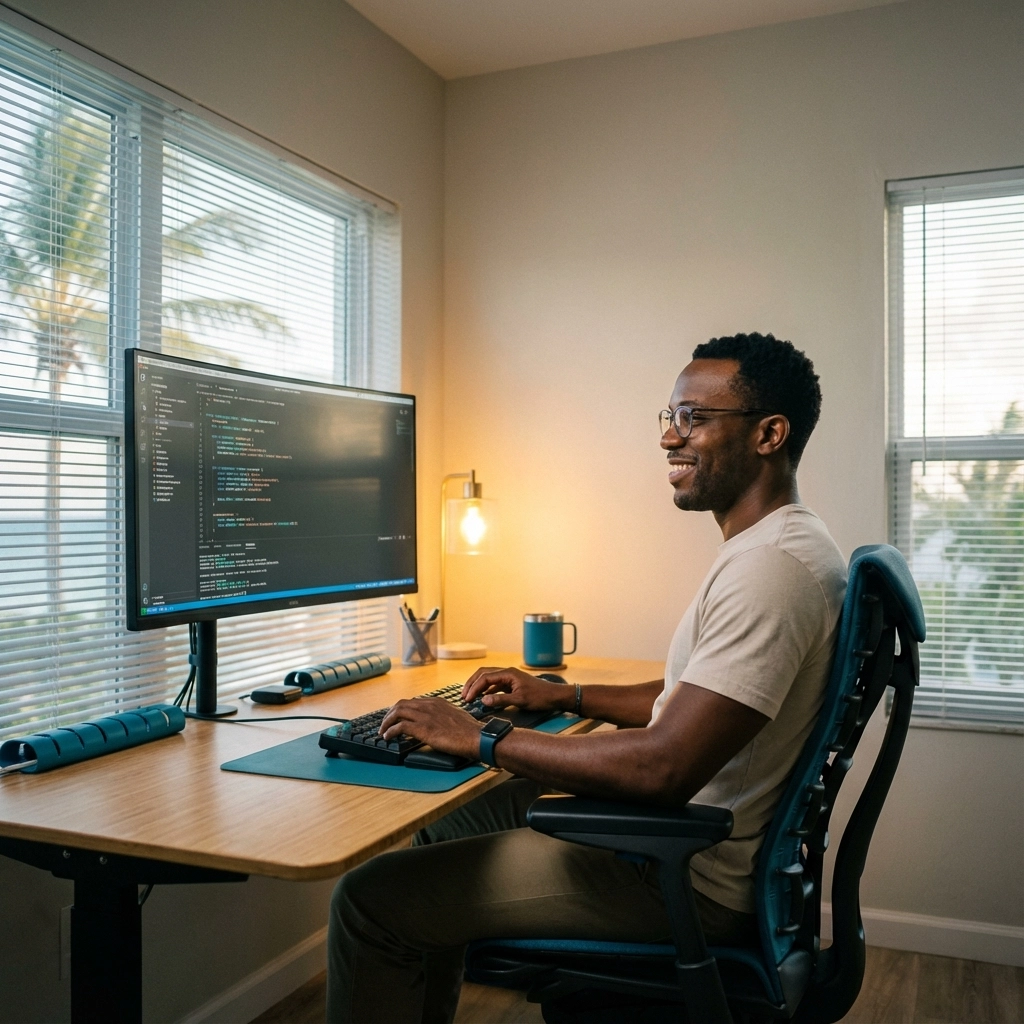
Your workspace lighting should be approximately half as bright as typical office lighting. Avoid working in dark rooms with only your screen providing light : this creates harsh contrast that strains your eyes.
Position your monitor perpendicular to windows to minimize glare. Use adjustable blinds or curtains to manage Saint Lucia's intense natural light throughout the day.
What's involved?
During morning hours, you might need to angle your blinds to reduce direct sunlight. As the day progresses, adjust your window coverings to maintain consistent, comfortable lighting around your workspace.
Consider investing in a desk lamp with adjustable brightness to supplement natural light without creating glare on your screen.
Why it's worth prioritizing:
Proper lighting reduces the constant adjustment your pupils make between bright and dark areas. This seemingly small change can eliminate most headaches and eye strain symptoms within a few days of consistent implementation.
Step 3: Follow the 20-20-20 Rule
What is it?
Every 20 minutes, look at something 20 feet away for 20 seconds. This simple rule is considered the gold standard for digital eye strain prevention.
Clinical studies demonstrate that consistent application of this rule can reduce eye strain symptoms by up to 50% within two weeks.
What's involved?
Set a timer on your phone or use a break reminder app. When it goes off, stop what you're doing and find something in the distance to focus on : perhaps the furthest hills and valleys or boats on the water if you're lucky enough to have that view.
If you don't have distant views, focus on the farthest wall in your room or look out any available window. The key is shifting your focus from near (your screen) to far (anything beyond 20 feet).
Why it matters:
Your eye muscles get locked in the same position when you stare at screens. The 20-20-20 rule gives these muscles a chance to relax and reset, preventing the cramping and fatigue that builds throughout the day.
Why it's worth establishing:
You'll maintain better focus throughout your workday and avoid that afternoon crash where everything becomes blurry and concentration becomes impossible. Most people notice improved alertness and productivity within the first week of consistent practice.
Step 4: Increase Blinking and Use Eye Exercises
What's happening to your eyes?
During screen use, your blinking typically drops from 15-20 times per minute to just 4-7 blinks. This dramatic reduction means your eyes aren't getting properly moisturized, leading to dryness and irritation.
What's involved?
Practice deliberate, slow blinking for 10-15 seconds several times throughout your workday. Close your eyes fully, hold for a moment, then open slowly. This helps redistribute your tear film and moisturize your eyes properly.
Additionally, perform focus-shifting exercises by alternating focus between near objects (about 6 inches away) and far objects (20+ feet away). Hold each focus for 5-10 seconds before switching.

Why it matters:
Your tear film needs consistent refreshing to maintain clear vision and comfortable eyes. Without adequate blinking, your eyes become dry and gritty, making it difficult to focus and causing irritation that can last hours after you stop working.
Why it's worth practicing:
These exercises take less than a minute but provide immediate relief. You'll notice your eyes feel more comfortable and your vision stays clearer throughout long work sessions.
Step 5: Implement Technology and Break Management
What's available?
Blue light glasses or computer screen filters can help, especially during evening work sessions. While the science is still evolving, many users report better sleep quality and reduced eye fatigue when using these tools.
Install break reminder apps like Stretchly or EyeCare Plus to maintain consistent rest intervals without relying on willpower alone.
What's involved?
Adjust your screen brightness to match your room's lighting level : your screen shouldn't be the brightest or darkest thing in your field of view. Keep contrast between 60-70% for optimal comfort.
Most devices now include built-in blue light filters (Night Shift on Mac, Night Light on Windows). Set these to activate automatically in the evening hours.
Why technology helps:
Automated reminders eliminate the guesswork and ensure you maintain healthy habits even when deep in focused work. You won't have to remember to take breaks : your technology will remind you.
Why it's worth investing in:
Quality blue light glasses can provide daily relief if you frequently work evening hours. Break reminder apps are often free and can transform your work habits within weeks.
When to Seek Professional Care
If you're experiencing persistent headaches, frequent blurred vision, or eye discomfort that doesn't improve with these strategies, it's time for a comprehensive eye exam. Sometimes what appears to be digital eye strain is actually an underlying vision problem that glasses or contacts can easily correct.
At Bèl Zyé Eye Care, we understand the unique challenges remote workers face. Our team can assess your individual risk factors and provide personalized recommendations for maintaining healthy vision in your digital workspace.
Why professional assessment matters:
Uncorrected vision problems make digital eye strain significantly worse. A small prescription change or computer-specific glasses can often eliminate symptoms entirely, making your remote work more comfortable and productive.
Book your eye exam today to ensure your vision is optimized for the demands of remote work in Saint Lucia's unique environment.
Comments